
 ultimate-guide
Is AI Automation Cost Effective 2026
Table of Contents
- The Real Cost of AI Automation
- AI Automation ROI Benchmark 2026
- Hidden Costs of AI Implementation
- Operational Efficiency Gains and Productivity Metrics
- AI Integration with CRM Best Practices
- Build vs. Buy vs. Integrate: Making the Right Choice
- When AI Automation Makes Financial Sense
Last Updated: August 26, 2026
The Real Cost of AI Automation
When you're evaluating whether AI automation cost effective investments make sense for your business, the question isn't simple. Many organizations approach this with a single number in mind, the software subscription cost, and call it a day. That's where most analyses fall apart.
The real financial picture involves multiple layers: implementation expenses, infrastructure demands, ongoing maintenance, human oversight, and the risk of failed deployments. Azmi AI works with businesses across different scales to design custom solutions that account for all these factors, not just the headline price tag.
Consider this: a chatbot that costs €50 per month looks cheap until you factor in the engineering hours needed to integrate it with your existing systems, the staff time spent training the model on your specific workflows, and the support costs when the automation mishandles a customer interaction. These hidden costs often dwarf the software expense itself.
The goal of this guide is to move beyond surface-level cost assumptions and give you a transparent framework for evaluating whether is AI automation cost effective for your specific situation. We'll break down where money actually goes, benchmark realistic ROI timelines, and show you how to spot implementations that will and won't move the needle.
AI Automation ROI Benchmark 2026
The payback period for AI automation implementations typically ranges from 6 to 18 months for most mid-market businesses, though this varies significantly based on use case and execution quality. Organizations that achieve faster returns tend to focus on high-volume, repetitive processes where the AI handles 70% or more of interactions without human intervention.
What matters most is matching the automation to a process that generates enough transaction volume to justify the investment. A business handling 50 customer support inquiries daily sees faster ROI than one handling 5. Similarly, a lead qualification workflow that processes 200 prospects monthly outperforms one touching 20.
The most common mistake is deploying AI broadly across multiple workflows simultaneously. Concentrated focus on one high-impact process, whether that's customer support, appointment scheduling, or lead qualification, produces measurable results within 90 days. Spreading resources thin across five different automation attempts typically results in none of them reaching full effectiveness.
Operational efficiency gains compound over time. Teams report that after the initial 3-month learning curve, productivity improvements accelerate. What took 40 hours weekly in month one drops to 15 hours by month six as the system learns your specific patterns and edge cases. This efficiency curve is where the real ROI emerges.
Gartner's 2026 AI Adoption Study found that organizations with clear automation targets achieved 35-40% faster time-to-value than those without. The differentiation wasn't the technology, it was the clarity of focus.
Hidden Costs of AI Implementation
This is where most cost analyses fail. The software subscription represents perhaps 20-30% of total implementation spending for a custom solution. The remaining 70% lives in areas that don't appear on a line item but absolutely affect your bottom line.
Technical integration costs consume significant resources. Your AI system needs to connect with your CRM, payment processor, calendar system, and support ticketing platform. Each integration requires API configuration, data mapping, and testing. A typical mid-market integration takes 40-80 hours of engineering time (peer-reviewed research). That's real cost, whether you pay an external contractor or pull internal staff from other projects.
Model retraining and refinement is an ongoing expense that many businesses underestimate. Your AI performs well on the 80% of interactions that match training patterns. The remaining 20% require periodic model updates, additional labeled data, and testing cycles. This maintenance work typically runs 5-10 hours monthly for an active deployment.
Human-in-the-loop oversight is essential but often invisible in cost projections. Even sophisticated AI systems need human review for edge cases, complaint escalations, and quality assurance. A customer service team doesn't shrink from 5 people to 1 person, it typically shrinks to 3 people who now spend time supervising the AI rather than handling routine inquiries. That's a cost reduction, but not the 80% cut some vendors imply.
Compliance and security hardening adds expense that varies by industry. If you're handling financial data, healthcare information, or personal identifiers, your AI deployment needs additional security layers, audit trails, and compliance documentation. Financial services companies often see 15-25% of implementation costs go toward security infrastructure.
Failure recovery costs rarely get discussed until they happen. When an AI system books a customer at the wrong time, sends a response that damages trust, or processes a transaction incorrectly, recovery requires staff time, customer service outreach, and potential compensation. Budget for this reality by maintaining human escalation paths and monitoring systems that catch errors before they reach customers.
Operational Efficiency Gains and Productivity Metrics
The measurable productivity improvements from AI automation typically manifest in three ways: reduced handling time per transaction, increased transaction throughput, and freed staff capacity for higher-value work.

A business processing customer support inquiries might see handling time drop from 12 minutes per ticket to 3 minutes for routine questions, with the AI handling first-response and basic troubleshooting. That's a 75% time reduction on high-volume interactions. Multiply that across 100 daily tickets and you're recovering 15 hours weekly, roughly two full-time employees worth of capacity.
Lead qualification workflows show similar patterns. Sales teams typically spend 20-30 minutes per inbound lead on initial qualification calls. An AI system that pre-qualifies leads, collects basic information, and schedules qualified prospects into your sales calendar can compress that to 5 minutes of human review time. For a firm processing 50 inbound leads daily, that's 20 hours weekly recovered.
Appointment scheduling automation eliminates the back-and-forth email chains that consume administrative time. A booking system that integrates with your calendar, checks availability, sends confirmations, and handles rescheduling requests can reduce scheduling friction from 8 minutes per appointment to 2 minutes. That's meaningful capacity recovery across your entire organization.
The key metric that separates successful implementations from disappointing ones is use rate, the percentage of transactions the AI handles without human intervention. Systems achieving 65-75% automation rates deliver strong ROI. Systems stuck below 50% typically don't justify the implementation cost. Azmi AI focuses on building workflows that hit that 65%+ threshold by understanding your specific business logic and edge cases upfront.
Time-to-value matters as much as the final efficiency gain. Organizations that see measurable improvements within 30 days maintain momentum and stakeholder buy-in. Implementations that take 6 months to show results often lose internal support before reaching their potential.
AI Integration with CRM Best Practices
Connecting your AI system to your existing CRM is where many implementations stumble. The technical integration is straightforward, APIs exist for most major platforms. The challenge is ensuring data flows cleanly and the AI understands your specific customer context.
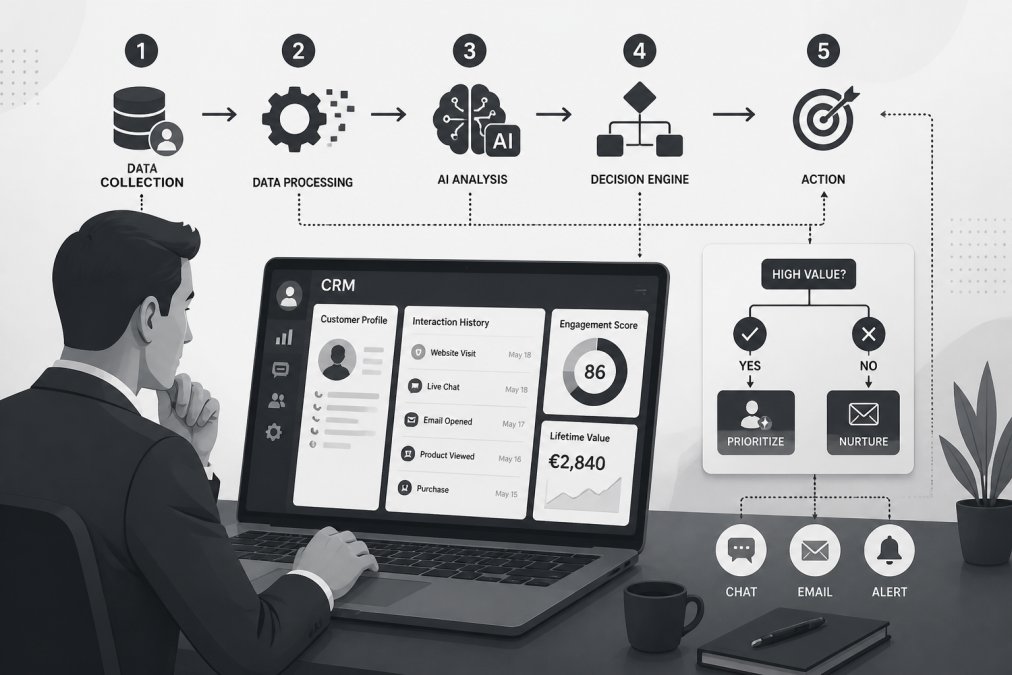
Start by auditing your current CRM data quality. If your contact records are incomplete, inconsistent, or outdated, your AI will inherit those problems. Spend time cleaning data before integration. This step often takes 20-40 hours but prevents months of frustration with poor automation decisions.
Map your critical workflows explicitly. Which CRM fields does the AI need to read? Which does it need to write to? What triggers should launch automation? Where do humans need to intervene? Document these decisions before any integration work begins. This clarity prevents scope creep and integration rework.
Test integrations in a sandbox environment first. Run your AI through realistic customer scenarios using test data. Verify that it reads customer history correctly, applies your business rules accurately, and escalates appropriately when needed. This testing phase typically requires 15-25 hours but catches integration issues before they affect live customers.
API consumption costs deserve specific attention. Each interaction your AI has with your CRM consumes API calls. High-volume deployments can generate thousands of API calls daily. Check your CRM's API pricing tier, some platforms charge per API call, others include unlimited calls in higher subscription tiers. For a business processing 200 customer interactions daily, API costs can range from negligible to several hundred euros monthly depending on your CRM platform's pricing structure.
Establish monitoring and alerting for integration health. Create dashboards that show API response times, error rates, and data sync status. When integration performance degrades, you want to know immediately rather than discovering it through customer complaints.
Document your integration architecture. When team members change, new staff need to understand how your AI connects to your CRM, where data flows, and what happens when something breaks. This documentation saves significant troubleshooting time later.
Build vs. Buy vs. Integrate: Making the Right Choice
This decision shapes your entire cost structure and implementation timeline. Each approach has distinct financial and operational implications.
Buying a pre-built solution (like a standard chatbot platform) offers the fastest deployment, typically 1-2 weeks from setup to launch. Costs are predictable: a monthly subscription plus basic configuration time. The tradeoff is limited customization. These platforms work well for generic use cases like FAQ handling or basic lead capture, but struggle with business-specific logic. If your workflows are standard across your industry, buying might be sufficient. If you have unique processes, you'll eventually hit the platform's limitations.
Building a custom solution from scratch gives you complete control but demands significant investment. Development typically requires 8-16 weeks and costs between €15,000 and €50,000+ depending on complexity. You own the entire codebase and can modify anything. The advantage is a system perfectly tailored to your business. The disadvantage is ongoing maintenance responsibility, you're responsible for updates, security patches, and performance optimization. This approach makes sense for large organizations with unique, high-value workflows that justify the investment.
Integrating a managed service like Azmi AI sits between these extremes. You get customization focused on your specific workflows without building from scratch. Implementation typically takes one week. Costs are lower than full custom development but higher than off-the-shelf platforms. You maintain operational responsibility but benefit from vendor expertise and ongoing support. This model works well for mid-market businesses needing more than standard solutions but lacking the resources for full custom development.
The financial decision hinges on three factors: workflow uniqueness, transaction volume, and your team's technical capacity. Standard workflows with high volume justify buying. Unique workflows with high volume justify building or integrating. Low-volume workflows rarely justify any significant investment.
When AI Automation Makes Financial Sense
AI automation delivers clear financial returns when three conditions align: high transaction volume, repetitive process logic, and clear escalation paths for exceptions.
High transaction volume is non-negotiable. A business handling 10 customer inquiries daily won't recover implementation costs through automation. One handling 200 daily will see payback within 6-12 months. The volume threshold depends on the process complexity and your labor costs, but generally, if you're not processing at least 50-100 transactions daily in the target workflow, the ROI math doesn't work.
Repetitive logic means the process follows consistent rules. "If customer is existing, pull their history. If they're asking about shipping, provide tracking info. If they're asking about returns, escalate to support" is highly automatable. "Help me figure out what product is right for my unique situation" is not. AI excels at processes with clear decision trees, not open-ended judgment calls.
Clear escalation paths matter because your AI won't handle 100% of cases. If 20% of interactions require human judgment, you need staff available to handle those escalations smoothly. If escalations create bottlenecks or frustrated customers, the automation creates more problems than it solves.
Beyond these structural factors, timing affects ROI significantly. Implementing AI automation when your team is already stretched thin delivers faster payback, the efficiency gains feel immediately valuable. Implementing when your team has capacity often feels like unnecessary complexity. The best implementations happen when pain is acute.
Industry context shapes ROI expectations. E-commerce businesses see faster returns from customer support automation because support volume is high and interactions are transactional. Service firms see faster returns from appointment scheduling automation because scheduling consumes significant administrative time. B2B lead-gen firms see faster returns from lead qualification automation because lead volume is substantial and qualification follows consistent criteria.
McKinsey's 2026 Automation and Workforce Report found that organizations achieving positive ROI on automation implementations shared one common factor: they focused on one high-impact workflow rather than attempting broad transformation. That focus matters more than the specific technology chosen.
The question isn't whether AI automation is cost effective in general, it's whether it's cost effective for your specific situation. That requires honest assessment of your transaction volume, process consistency, and escalation capacity. If those conditions are met, AI automation cost effective implementations typically deliver 2-4x return on investment within 18 months.
Whether AI automation makes financial sense depends on matching the technology to your actual business constraints. If you're processing high volumes of repetitive work, the efficiency gains are real and measurable. If you're hoping automation will solve low-volume, high-complexity problems, you'll be disappointed.
Azmi AI specializes in custom workflows that target your highest-volume, most-repetitive processes, customer support automation, appointment scheduling, and lead qualification. Our implementation approach focuses on rapid deployment (typically one week) and clear ROI measurement. Start with a free trial to see how custom AI workflows can improve your specific operational efficiency without the guesswork.
Frequently Asked Questions
What is the 30% rule in AI automation ROI?
The 30% rule suggests that businesses should expect to see approximately 30% cost reduction or efficiency gains within the first year of AI automation implementation. However, actual results vary significantly based on use case complexity, integration depth, and organizational readiness. E-commerce companies automating customer support typically see faster ROI, while complex enterprise workflows may require longer payback periods. Success depends on realistic baseline measurements and clear implementation targets.
What are the hidden costs of implementing AI automation?
Beyond software licensing, hidden costs include data preparation and cleaning, ongoing model retraining, API consumption charges, human oversight and exception handling, compliance and security infrastructure, staff training, and system integration work. Many businesses underestimate the cost of maintaining AI systems in production, including monitoring, updating, and fixing model drift over time. Long-term maintenance often exceeds initial implementation costs, particularly for custom agentic workflows that require continuous optimization.
How does AI automation impact long-term labor costs?
AI automation typically reduces repetitive task workload rather than eliminating entire roles. Customer support teams handle fewer routine inquiries but spend more time on complex issues and exception handling. Lead qualification automation frees sales teams to focus on relationship-building. The financial benefit comes from redeploying staff to higher-value work, not necessarily headcount reduction. Organizations that fail to reallocate saved time often see minimal ROI, as labor costs remain unchanged despite efficiency gains.
Is AI automation scalable for small and medium-sized enterprises?
Yes, but with important caveats. Small firms with high-volume repetitive processes (customer inquiries, booking requests) see faster ROI. Those with fewer than 5 support staff may struggle to justify custom implementation costs. Cloud-based AI solutions and pre-built workflows lower barriers for SMEs compared to enterprise-grade systems. Implementation timelines of one week for basic setups make it feasible for resource-constrained teams. Success depends on selecting use cases with clear volume metrics and measurable time savings.
This article was written using GrandRanker