
 ultimate-guide
AI for E-Commerce Support Automation: A 2026 Guide
Table of Contents
- What AI for E-Commerce Support Automation Does
- Benefits of 24/7 AI Customer Support for Online Retailers
- AI Customer Service Automation Best Practices
- AI-Driven Order and Return Management
- Predictive Analytics and Customer Behavior
- Implementation Roadmap for Non-Technical Teams
- Data Privacy and Compliance in AI Support
- Measuring ROI and Performance Metrics
Last Updated: August 28, 2026
What AI for E-Commerce Support Automation Does
AI for e-commerce support automation uses machine learning and natural language processing to handle customer inquiries, process orders, manage returns, and qualify leads without constant human intervention. These systems deflect routine questions, escalate complex issues to humans, and operate 24/7 across time zones and languages.
A customer submits a question, the AI processes it, determines the appropriate response or action, and either resolves it independently or hands it off to a human agent with full context. This reduces response time, cuts support workload, and keeps your business reachable when your team isn't available.
At Azmi AI, we've built custom agentic workflows that integrate directly into your existing systems, your CRM, payment processor, booking platform. The AI doesn't just answer questions; it performs actions. It can retrieve order status, initiate refunds, schedule appointments, or flag high-priority leads for your sales team. The difference between a chatbot that talks and an AI agent that acts is what separates incremental improvement from operational transformation.
Most businesses start with support deflection and expand into lead qualification, appointment automation, and dynamic pricing. ROI depends on your current support cost per ticket and monthly routine inquiry volume. If you're handling dozens of repetitive questions daily, automation compounds quickly.
Benefits of 24/7 AI Customer Support for Online Retailers
Round-the-clock availability is the clearest advantage. Customers expect instant responses, especially in e-commerce. A customer browsing at 2 AM shouldn't wait until business hours for an answer about shipping costs or product specifications. An AI system answers immediately, in their language, with accurate information from your database.
The second major benefit is support team capacity. Instead of hiring additional staff for off-hours or volume spikes, your existing team focuses on genuinely complex issues requiring judgment, empathy, or creative problem-solving. Routine questions get handled by the AI; your humans handle angry customers, unusual requests, and non-standard situations.
Omnichannel consistency matters significantly. When a customer reaches you via email, chat, or social media, they interact with the same AI system operating under the same rules. Every customer gets consistent tone, information, and policy interpretation, improving satisfaction scores and reducing escalated complaints.
Operational efficiency extends beyond support. When your AI system integrates with order management and CRM systems, it becomes a data collection engine. Every interaction reveals which products generate the most support load, which customer segments ask similar questions, and where documentation is failing.
Revenue impact comes from reduced churn and improved conversion. Answered questions in seconds instead of hours increase purchase completion. Smooth automated returns processing encourages repeat purchases. Cart recovery sequences triggered by abandoned carts recover otherwise-lost sales.
AI Customer Service Automation Best Practices
The most common mistake is deploying an AI system without defining success beforehand. Teams implement automation, watch tickets decrease, and assume it's working. But if the AI deflects easy questions while missing ones that need human attention, you've optimized for the wrong metric.
Start by categorizing your current support tickets. Tag every incoming question: routine (product info, shipping, returns policy), semi-routine (specific order issues with clear resolution paths), and complex (product recommendations, complaints, unusual requests). Most teams find 60-70% of volume is routine or semi-routine, your automation target (peer-reviewed research).
Natural language processing is the engine that makes this work. Rather than rigid rules, modern systems understand intent. A customer asking "Do you have this in blue?" and "Is blue available?" are asking the same question. The AI recognizes that and responds accordingly.
Natural Language Processing for Customer Intent
Natural language processing (NLP) analyzes customer text to determine what they actually want, not just what words they used. It separates intent from surface-level phrasing.
Your AI system handles variations in how customers phrase requests. Someone might ask "When will this ship?", "How long before it arrives?", or "Is this in stock?" All three are intent-matched to order status queries. Without NLP, you'd need dozens of rigid rules. With it, the system learns patterns and handles novel phrasings.
Sentiment analysis runs parallel to intent recognition. The AI detects whether customers are frustrated, satisfied, or neutral. A frustrated customer asking about a return gets routed to a human immediately. A satisfied customer asking for recommendations might be handled entirely by the AI. This human-in-the-loop approach preserves relationships while automating safely.
Your AI system needs access to your actual product database, order history, and customer records. Generic chatbots without system connections can't verify stock, retrieve order details, or make informed recommendations. Integration is non-negotiable.
Human-in-the-Loop Workflows for Complex Issues
Not every interaction should be fully automated. The best systems use human-in-the-loop (HITL) workflows: the AI handles what it can confidently resolve, flags uncertain cases for human review, and escalates genuinely complex issues immediately.
A HITL workflow: customer asks a question, the AI generates a confidence score. If above 85%, the AI responds. Between 60-85%, the AI drafts a response for human review. Below 60%, the issue goes straight to a human with full context. This keeps automation high while maintaining quality.
When an AI system hands off to a human, it should include the full conversation history, customer order details, and what the AI attempted to resolve. A human agent without context wastes time and frustrates the customer. Proper handoff preserves experience and helps your team.

Define escalation triggers clearly. If a customer mentions a refund, does that auto-escalate? If they use negative language? If they mention a competitor? Your rules determine whether escalation happens too early (wasting human time) or too late (damaging relationships). Most teams find explicit keywords combined with sentiment analysis work better than a single perfect rule.
AI-Driven Order and Return Management
Order tracking is one of the highest-volume support inquiries, accounting for 20-30% of many retailers' support load (peer-reviewed research). An AI system connected to your shipping provider's API answers instantly: current location, expected delivery date, tracking number. Your support team handles zero tickets for this.
Return management is more complex but equally automatable. A customer initiates a return through your AI system. The system verifies eligibility (within return window, not final-sale), generates a return label, and sends it immediately. When the item arrives, the system initiates the refund. Your team only gets involved if something goes wrong.
Predictive analytics inform this process. Your AI system learns which products have highest return rates, which customer segments are most likely to return, and which return reasons appear most frequently. A product with a 40% return rate might need better photography or clearer size guidance, not more aggressive promotion (the NIH).
Returns handled entirely by automation reduce refund processing time from days to hours. Faster refunds improve satisfaction and reduce chargebacks or disputes. Cost savings from reduced manual processing often justify the automation investment alone.
Predictive Analytics and Customer Behavior
Predictive analytics uses historical data to forecast future behavior. Your AI system analyzes past interactions, purchase patterns, and support inquiries to predict what individual customers will do next.
Identifying customers likely to churn before they leave is a common application. If a customer's purchase frequency drops or they haven't engaged in 60 days, the system flags them. Your team can proactively reach out with a discount or ask what went wrong. Customers retained through proactive outreach have higher lifetime value than those who've already decided to leave.
Product recommendations are another use case. Rather than showing every customer the same popular items, the AI recommends products based on that individual's browsing history, purchase history, and similar customers' preferences. Personalized recommendations increase average order value and reduce return rates.
Churn reduction through predictive intervention often delivers faster ROI than support automation alone. Identifying and retaining just a few high-value customers who would otherwise have left covers the automation investment.
Implementation Roadmap for Non-Technical Teams
Most teams worry that implementing AI automation requires deep technical expertise. The process can be broken into manageable steps without requiring custom code.
Phase 1: Define Your Scope (Week 1) Audit your current support tickets and categorize them. Identify which 10-15 questions appear most frequently. These become your initial automation targets. Start with high-volume, low-complexity inquiries.
Phase 2: Data Preparation (Week 1-2) Compile your existing documentation: product specs, shipping policies, return policies, FAQ content. Gather historical support tickets showing how your team currently answers common questions. This becomes training material for your AI system. Better source material means better AI performance.
Phase 3: System Integration (Week 2-3) Connect your AI system to your actual business systems via API integrations with your e-commerce platform, CRM, shipping provider, and payment processor. This determines whether your AI can retrieve order information or just discuss it theoretically. Most modern platforms offer pre-built integrations your team can configure without coding.
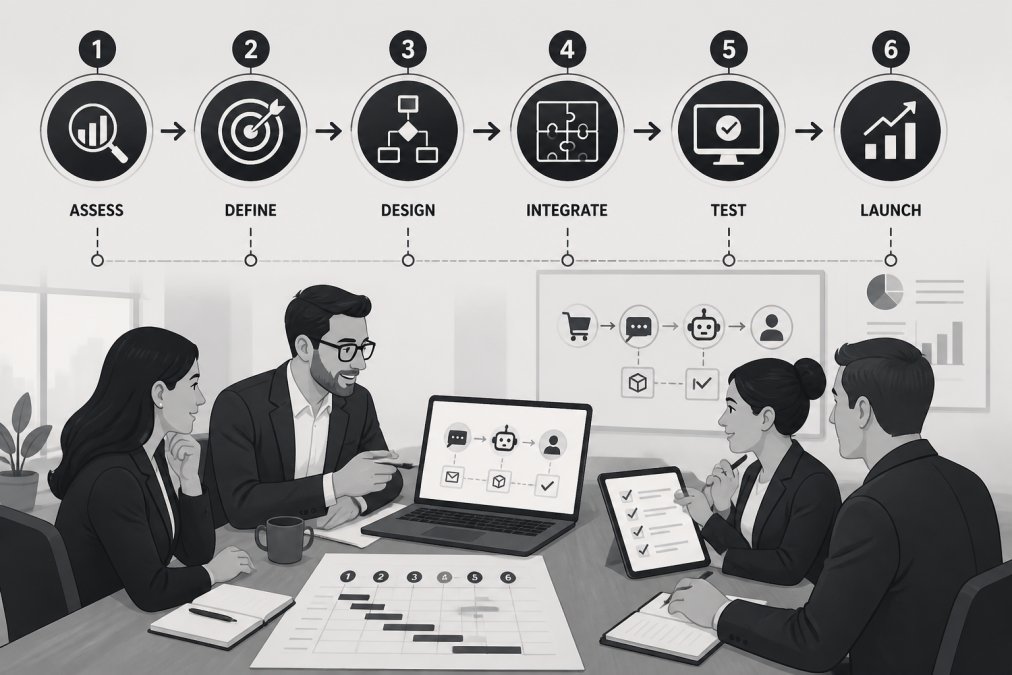
Phase 4: Training and Testing (Week 3-4) Run your AI system in shadow mode: it processes real inquiries but doesn't respond. Your team reviews responses and provides feedback. After 100-200 interactions, quality typically stabilizes. Then enable live responses for low-risk categories first (product information, shipping policies) before expanding to higher-stakes interactions.
Phase 5: Monitoring and Optimization (Ongoing) Track key metrics: deflection rate, customer satisfaction scores, escalation rate. Most teams see deflection improve from 40% in week one to 65-75% by week four as the system learns from edge cases.
Four weeks from decision to live deployment is realistic for most teams. Azmi AI handles technical integration and system configuration; your team provides business knowledge and customer feedback. You're teaching the system how your business operates, not learning to code.
Data Privacy and Compliance in AI Support
Customer data flowing through an AI system creates compliance obligations. You need to understand what data the system processes, where it's stored, and who can access it.
Data protection regulations govern how customer information can be used. Your AI system must comply with these rules, meaning explicit customer consent before their data trains the AI, clear data retention policies, and the ability to delete customer data on request.
Where data is processed matters critically. If your AI system processes customer data on servers outside your jurisdiction, you may face additional compliance requirements. Many teams address this by choosing systems offering local data processing or data residency guarantees.
Your AI system should log interactions with proper access controls. Not every employee should read customer conversations. Sensitive information should be redacted before data is used for training or analysis.
If an AI system makes a mistake, books an appointment incorrectly, processes a refund wrong, or provides false product information, who's responsible? The answer depends on system configuration and contracts. Most reputable AI providers share responsibility: they ensure the system works as designed, but you're responsible for accurate training data and proper integration.
Start with low-stakes automation (product information, shipping policies) where mistakes are recoverable. Expand to higher-stakes interactions only after proven reliability. Maintain human review for edge cases.
Measuring ROI and Performance Metrics
ROI depends on your current cost structure. If you're paying support staff to handle 1,000 tickets monthly and automation deflects 600, you've eliminated 60% of your support workload, either 60% cost reduction or 60% capacity freed for higher-value work.
The calculation: (tickets deflected per month × cost per ticket) - (automation system cost per month) = monthly ROI. If each ticket costs 15 euros and you deflect 600 monthly, that's 9,000 euros in savings. If your automation system costs 2,000 euros monthly, you're looking at 7,000 euros net benefit monthly, or 84,000 euros annually.
Full ROI includes secondary benefits: faster response times improve conversion rates, better satisfaction increases lifetime value, and proactive outreach retains high-value customers.
Track these metrics weekly: deflection rate, average response time, customer satisfaction score (CSAT), ticket resolution rate, and escalation rate. Most teams see deflection improve from 40% in week one to 65-75% by week four.
Automation works best for businesses with significant support volume and clear, repeatable processes. A small team handling 50 tickets monthly might not see quick ROI. A large retailer handling 5,000 monthly tickets will see ROI within 60 days.
Automation isn't about replacing your team, it's about giving them back time. Your support staff spends less time answering "Where's my order?" and more time solving actual problems, building customer relationships, and improving your business. That's where the real value lives. Azmi AI's custom agentic workflows integrate into your existing systems within approximately one week, turning your website visitors into engaged customers across every time zone. Start with a free trial to see how AI-driven automation works for your specific business needs.
Frequently Asked Questions
What's the difference between basic chatbots and agentic AI for e-commerce support automation?
Basic chatbots follow pre-programmed rules and respond to keywords. Agentic AI uses machine learning and natural language processing to understand customer intent, make autonomous decisions, and handle multi-step workflows. Agentic systems can qualify leads, process returns, and escalate issues to humans without rigid scripts. They improve over time as they process more customer interactions, delivering personalization at scale.
How does AI for e-commerce support automation reduce support team workload?
AI handles routine inquiries instantly: order status checks, return eligibility, FAQ responses, and appointment scheduling. Support ticket deflection through automated resolution frees your team to focus on complex issues requiring empathy or judgment. With 24/7 availability, AI captures inquiries outside business hours, preventing backlog. Most teams report reduced first response time and higher first-contact resolution rates, directly lowering operational costs.
Can AI support automation work with existing e-commerce platforms and CRM systems?
Modern AI solutions integrate via API-driven architecture, connecting to Shopify, WooCommerce, custom platforms, and CRM tools. Integration typically takes days rather than months. The system reads order data, customer history, and inventory in real time, enabling contextual responses. Before deployment, verify your platform's API documentation and ensure your vendor supports your specific stack to avoid costly custom development.
What compliance and data privacy concerns apply to AI customer support?
In the EU, GDPR governs customer data handling. AI systems must obtain consent for data processing, enable customer rights (access, deletion), and maintain audit trails. Ensure your AI vendor implements encryption, regular security audits, and complies with regional regulations. Document your data processing agreements and test your system's ability to delete customer data on request. Non-compliance risks fines and customer trust damage.
This article was written using GrandRanker